Keep one customer relationship while organizing every service location.
850 Work lets a service business keep one customer or parent company, then add each property as a separate service location. Jobs, schedules, estimates, invoices, contacts, service notes, photos, and history can point to the exact place where work happened while billing details remain with the responsible account.
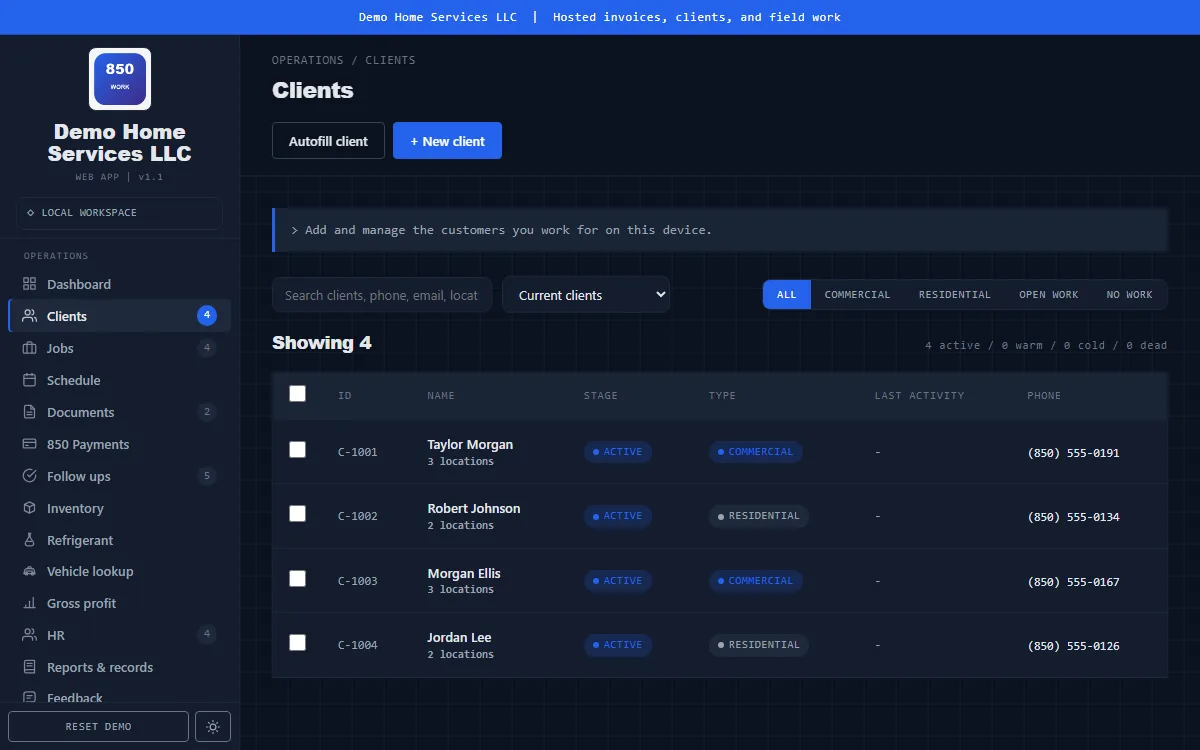
One payer, several places where work happens
A restaurant group, property manager, homeowner, marina customer, franchise, or facilities company may pay from one address while requesting service at several locations. Creating a duplicate customer for every site fragments contacts, documents, payment history, and follow-up.
Parent customer
Keep the responsible person or company, billing address, primary contacts, payment history, and account notes together.
Separate service locations
Add offices, restaurants, rentals, shops, warehouses, boats, docks, piers, and other job sites under the same relationship.
Location-specific contacts
Retain the person, access details, phone, email, and instructions relevant to each place when the job site differs from billing.
Clear jobs and schedules
Use the selected location on jobs and schedules so technicians see the correct address and site details before traveling.
Correct estimates and invoices
Customer documents can identify the service location while preserving the responsible customer and billing relationship.
Complete service history
Review work by customer or by location without losing the connection between properties owned or managed by the same account.
A clean multi-location workflow
- Search before creating a customer. Check name, company, phone, email, and address to avoid duplicate relationships.
- Create or select the responsible account. Store the billing address and primary contacts on the customer.
- Add the actual service location. Record the property name, address, location contact, access details, and marine fields when relevant.
- Create the job at that location. Use the format Client - Location - Job description so lists remain understandable.
- Link documents and history. Estimates, invoices, notes, photos, and follow-up remain connected to both the customer and exact site.
- Archive closed locations. Preserve historical records instead of rewriting old work to a new address.
Read the customer and service-location guide for a detailed setup process, or review the broader customer management features.
Examples of customer and location structure
Restaurant group
Customer: Apple Dining Group. Locations: Downtown restaurant, beach restaurant, and commissary kitchen.
Property manager
Customer: Smith Property Management. Locations: each managed home, office, storefront, or rental property.
Marine service
Customer: vessel owner or business. Location: marina, boat number or name, pier, dock, and slip details.
Multi-location customer management FAQ
Should every service address be a separate customer?
No. When one person or company is responsible for several locations, keep one customer and add each job site as a service location.
How should the job title be formatted?
Use Client - Location - Job description so the customer, exact site, and reason for the work are visible in lists.
Can invoices show the work location?
Yes. Select the related service location so the document identifies where the work occurred while retaining the customer relationship.
What happens when a location closes?
Archive it when possible so old jobs and documents continue to identify the actual service site.