Know what is on every truck. Restock before the next job.
Track parts, tools, supplies, vehicle records, and assigned drivers in one place. Print a truck inventory and safety checklist directly from the saved truck record.
Just need a form? Get the free printable truck inventory checklist.
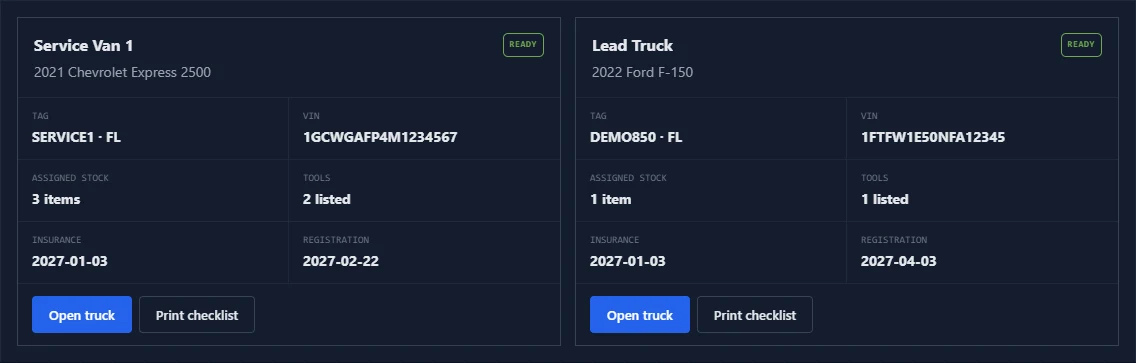
Build the form from information you already saved.
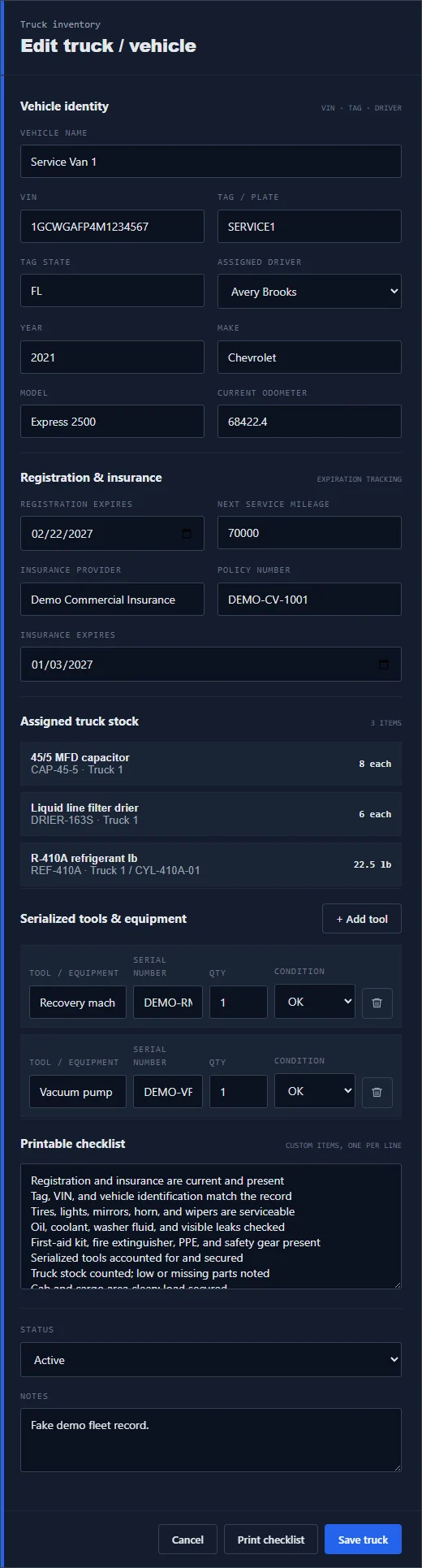
The truck record keeps the vehicle, driver, documents, stock, tools, and checklist together. When it is time for a count or inspection, select Print checklist instead of rebuilding a paper form.
Count stock, check the vehicle, and sign off on one sheet.
The printed checklist is made from the truck record. It gives the technician or owner a clean field form without requiring a separate spreadsheet or handwritten template.
The form includes: vehicle details, inspection checks, expected and physical inventory counts, serialized tools, exceptions, notes, and signatures.
Download a free blank checklist (PDF)
A two-page printable sample, with no account or email required. The app's populated form is generated separately from your saved truck record.
| Inventory item | Expected | Physical | Condition / restock |
|---|---|---|---|
| 45/5 MFD capacitor | 8 each | ||
| Liquid line filter drier | 6 each | ||
| R-410A refrigerant | 22.5 lb |
Stock, tools, paperwork, and vehicle details stay together.
A truck carries more than countable parts. 850 Work gives each vehicle a practical record for the items, documents, and checks that follow it through daily work.
Truck and warehouse quantities
See which parts and supplies belong to a truck, the warehouse, or another location.
Minimums and shortages
Use on-hand quantities and reorder points to see what needs attention before dispatch.
Serialized equipment
Keep tool name, serial number, quantity, condition, and assigned truck in the vehicle record.
Refrigerant by the pound
Track decimal quantities and cylinder details without treating refrigerant like a box of parts.
VIN, tag, driver, and mileage
Keep the identity and assignment details a service business needs for each truck.
Insurance and registration
Store provider, policy, expiration, registration, and next service mileage with the truck.
A shortage becomes a clear next action.
Use the truck balance or printed count sheet to confirm what is physically available, then update or move stock without losing the location trail.
- 01 / CountCheck the truckCompare the expected amount with the physical quantity and condition.
- 02 / ReviewFind the shortageSee low, out, damaged, missing, or unknown stock before the next job.
- 03 / MoveRestock the truckRecord the warehouse, truck, item, quantity, person, date, and notes.
- 04 / ConfirmKeep the remainder visibleA partial restock stays partial so the unresolved need is not forgotten.
Use the printable truck inventory checklist guide or read the service truck replenishment guide.
Truck inventory belongs beside the job, invoice, and technician.
850 Work keeps the truck record in the same workspace as daily operations. Parts remain physical inventory, measured supplies keep their units, and labor stays in service templates instead of becoming fake stock.
Service truck inventory FAQ
Can 850 Work track more than one service truck?
Yes. Each truck can have its own vehicle record, assigned driver, stock, serialized tools, document dates, physical counts, and printable checklist.
What is included on the printable truck checklist?
The printable form includes vehicle and driver details, registration and insurance fields, an inspection checklist, inventory count rows, serialized tools, notes, and signoff.
Can stock move between the warehouse and service trucks?
Yes. 850 Work can record stock by location and support warehouse-to-truck or truck-to-truck movement so shortages and restocking stay visible.
Can 850 Work track refrigerant and serialized tools?
Yes. Refrigerant can use measured quantities such as pounds, while tools and equipment can retain serial numbers, quantities, condition, and truck assignment.
Does labor get counted as truck inventory?
No. Labor and non-stock services stay separate from physical inventory so they do not create fake stock counts.
Put every truck, form, tool, and restock list in one workspace.
Open the demo to inspect the live truck cards, or start a workspace and build the first truck record for your business.